

AVPro Edge AC-EX150-BKT
150 Meter 4K HDMI Extender Kit over Category Cable, with both RX and TX units
-Gregory W.



Description
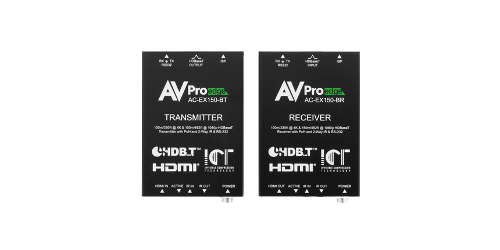
Keep an existing category cable run in service during a display upgrade with the AC-EX150-BKT. This matched transmitter and receiver kit supports up to 150 meters at 1080p and up to 100 meters for supported 4K HDMI signals at up to 18 Gbps. AVPro Edge specifies Cat5e or better and recommends verifying the existing cable path.
Built-in EDID management, 4K-to-1080p scaling, bidirectional IR and RS-232 help when the new source and the existing display have different requirements. The pair uses power over cable and requires its supplied power adapter.
Use these two units together and keep the link separate from other HDBaseT equipment. A long route may serve a legacy screen today and a 4K replacement later.
Measure against the shorter 4K limit if that upgrade is planned. For shorter routes designed around compatible HDBaseT equipment, compare the 40 m 18 Gbps HDBaseT kit. The long-distance kit is designed around its own matched transmitter and receiver.
Planning the category cable run
Map any intermediate junctions before counting on a legacy run. The benefit of reusing the cable is greatest when the technician can identify where the run starts, where it ends and what lies between. Allow time for a bench test with the supplied power adapter and an on-site test with the installed cable.
The kit is a fit for retrofits where pulling new cable would disrupt a finished space. Trace the existing route, check continuity and test the highest required HDMI format before reusing the run.
If the system uses a coupler or patch point, include it in the test so you are checking the actual path.
Treat the category run as a dedicated point-to-point connection. Measure the installed path, including any service loops, and match the cable to the distance and video format you need. A bench test with short leads can confirm the source and display settings before you check the installed run at full length.